Project Background
This project was initiated to optimize the storage system of a medium-sized enterprise. The company experienced slow I/O performance, frequent downtime, and high maintenance costs.
Problem Analysis
Before optimization, the storage system had the following issues:
- High latency in data read/write operations
- Frequent disk failures causing downtime
- Lack of automated monitoring and alerts
- Inefficient RAID configuration and storage allocation
Optimization Strategy
To address these issues, we implemented a multi-layered optimization plan:
- I/O Tuning: Adjusted read/write caching, block sizes, and queue depth for performance improvement.
- RAID Reconfiguration: Migrated to RAID 10 for better performance and redundancy.
- Storage Allocation: Segmented critical workloads to SSDs and archival data to HDDs.
- Monitoring & Alerts: Deployed automated monitoring with email/SMS alerts for disk health and I/O latency.
Implementation Process
The optimization process was executed in phases to avoid system downtime:
- Phase 1: Baseline performance assessment and system snapshot
- Phase 2: RAID reconfiguration and SSD allocation
- Phase 3: I/O tuning and caching optimization
- Phase 4: Monitoring system setup and testing
Results & Outcomes
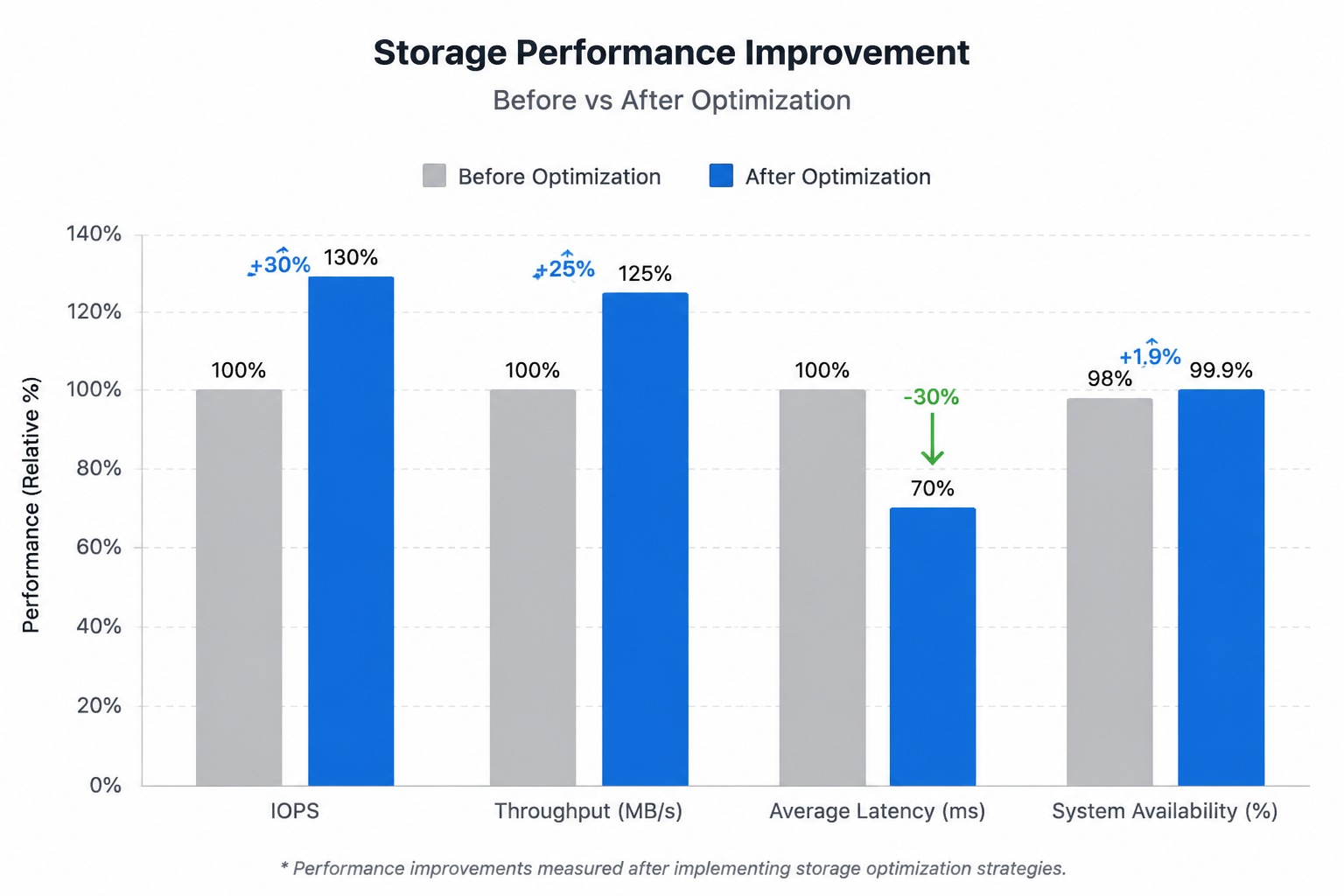
After optimization, the storage system achieved:
- 30% increase in read/write performance
- Significant reduction in downtime due to improved RAID redundancy
- Real-time alerts preventing potential disk failures
- Lower operational cost due to efficient storage usage
Conclusion & Key Takeaways
This case demonstrates how careful planning, monitoring, and phased implementation can improve system performance and reliability. Key lessons include:
- Assess the current system performance before making changes
- Optimize I/O and storage allocation for critical workloads
- Implement RAID configurations balancing performance and redundancy
- Automate monitoring to catch issues before they impact operations
Optional Visuals
Insert diagrams, performance charts, or screenshots to illustrate before/after metrics. Example: